Workflow for electrical project updates: a UK guide
Discover how to synchronise dispatch, evidence capture, and invoicing into a single traceable system to streamline your electrical projects and reduce administrative overhead.
By James Shorter ·
Workflow for electrical project updates: a UK guide

TL;DR:
- An effective electrical project update workflow links dispatch, evidence capture, submittals, and invoicing within a single traceable system. This approach reduces delays, minimises administrative effort, and ensures complete documentation by assigning clear ownership and using integrated tools. Proper version control and structured communication plans are essential to prevent revision drift and coordinate stakeholder updates effectively.
A workflow for electrical project updates is a connected operating flow that links every stage from initial request through dispatch, field evidence capture, and invoicing into one traceable system. Without that connection, office staff rebuild job history from memory, technicians miss context, and clients chase updates that should arrive automatically. The industry term for this end-to-end process is integrated project update management, and UK electrical contractors who implement it correctly report measurable reductions in administrative time and project delays. This guide covers the tools, steps, and communication structures you need to make it work.
What does an effective workflow for electrical project updates require?
An effective workflow for electrical project updates depends on four connected components: dispatch software, mobile field tools, schedule and budget tracking, and a structured communication plan. Each component must exchange data with the others. A system where dispatch lives in one spreadsheet, photos sit in a WhatsApp group, and invoices are typed manually is not a workflow. It is a collection of disconnected tasks.
The core tools UK electrical contractors use to build this connection include:
- Dispatch and job management software such as Field Ascend, which links work orders, inspection requirements, and invoicing in one connected system. This prevents fractured records where office staff cannot reconstruct what happened on site without calling the technician.
- Photo documentation and mobile apps such as CompanyCam, which give technicians a structured way to capture onsite evidence. Photos, test notes, and corrective actions attach directly to the job record rather than floating in a chat thread.
- Schedule and budget tracking platforms such as Buildertrend, which connect programme milestones to financial progress so project managers see cost and time data together rather than separately.
- A communication matrix that defines who receives which update, in what format, at what frequency, and who owns delivery. Without this, updates happen inconsistently and stakeholders fill the gap with informal messages.
IT infrastructure and training matter too. Mobile tools only work if technicians have reliable devices and know how to use them. A two-hour onboarding session is not sufficient for a team that has operated on paper for ten years. Plan for phased adoption with a named internal champion on each project.
Pro Tip: Create a single centralised evidence thread per job from day one. Every photo, test note, and sign-off attaches to that thread. When the job closes, the invoice-ready record already exists. You will never need to chase a technician for documentation again.

How to execute a step-by-step process for electrical project status updates
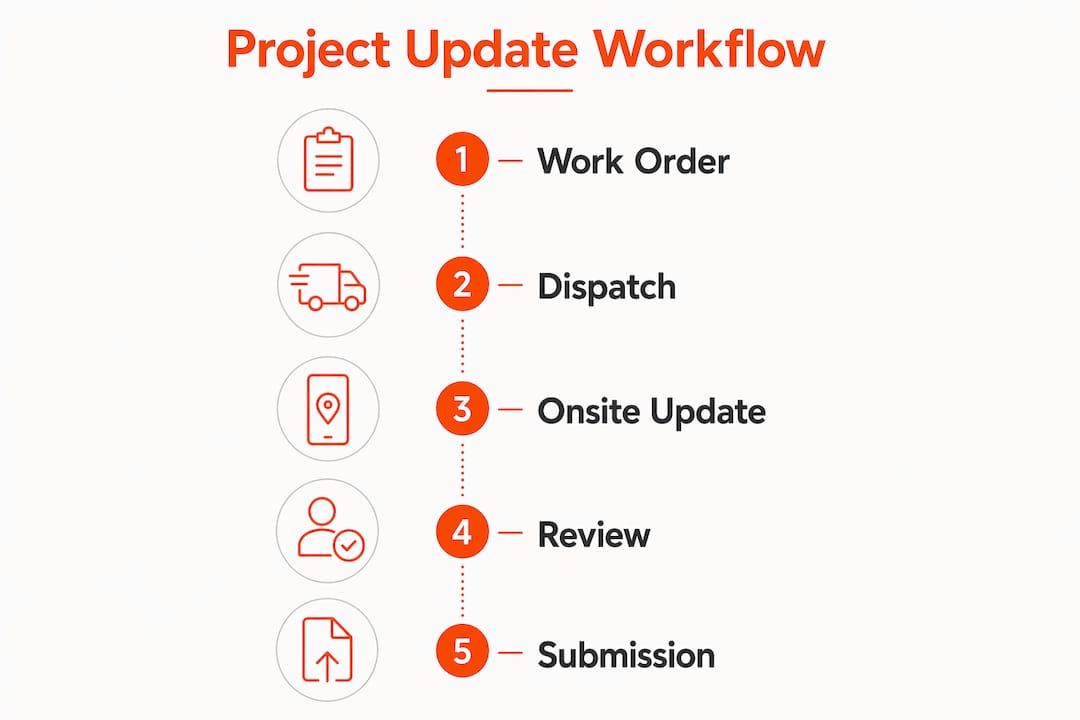
The step-by-step process for managing electrical project updates follows a clear sequence. Skipping any stage creates gaps that surface later as disputes, delays, or incomplete invoices.
- Create the work order with full context. Record the customer, site address, scope of work, priority level, and any existing estimate. A work order without context forces the technician to call the office before starting, which wastes time on both ends.
- Assign the technician by skill, location, and availability. Matching the right person to the job at the right time is the core function of dispatch. Dispatch software that surfaces skill sets and live availability removes the guesswork from this decision.
- Deliver job details and history to the technician’s mobile device. The technician should arrive on site knowing what was done previously, what parts are expected, and what the inspection requirements are. Delivering this through a mobile app removes the need for a pre-job briefing call.
- Capture real-time status updates, check-ins, and evidence on site. Photos, test results, notes, and customer signatures attach to the job record as work progresses. This is the stage where most workflows break down. Field evidence that lives separately from the work order causes incomplete job records and invoicing delays.
- Manage submittals iteratively. Electrical projects require product data submittals for review and approval before procurement. Submittal workflows involve assembling product data, submitting for review, tracking feedback, revising, and obtaining final approval. A submittal register tracks every item through this cycle and prevents silent deviations from the approved specification.
- Close out with follow-ups and invoice-ready documentation. Once work is complete and signed off, the job record should contain everything needed to raise an invoice without additional data gathering.
The table below summarises each stage with its key inputs and outputs:
| Stage | Key inputs | Key outputs |
|---|---|---|
| Work order creation | Customer details, scope, estimate | Prioritised, contextualised work order |
| Technician assignment | Skill matrix, availability, location | Confirmed dispatch with job pack |
| Mobile job delivery | Work order, site history, parts list | Technician briefed before arrival |
| Onsite evidence capture | Photos, test notes, signatures | Auditable job record linked to work order |
| Submittal management | Product data, review feedback | Approved documentation for procurement |
| Job closeout | Completed evidence thread | Invoice-ready record, client sign-off |
What are the common pitfalls in updating electrical workflows?
The most damaging pitfall in electrical project update management is revision drift. This occurs when field-installed products no longer match the approved submittals because superseded documents were not withdrawn from circulation. Version control with issue dates and formal withdrawal notices is the only reliable defence. Every document in circulation should carry a version number and a clear status: current, superseded, or draft.
Other common problems include:
- Disconnected evidence systems. When photos sit in a separate app, test notes are emailed, and signatures are on paper, the job record is never complete. Reconnecting this evidence after the fact is slow and often inaccurate.
- Over-automation without review. Automated reporting reduced one contractor’s time on client progress updates from 52 hours to 11 hours weekly. However, automating without a project manager’s review before delivery risks sending inaccurate information to clients. Automation handles the formatting and delivery; a human confirms the content is correct.
- Report fatigue. Sending clients daily automated updates when they only need weekly summaries creates noise. Stakeholders respond better to updates that highlight changes since the last report with explicit next steps, not activity logs.
- Missed deadlines in contract administration. NEC and JCT contracts carry strict notice periods. A missed early warning notice or compensation event response can weaken your commercial position significantly.
The most overlooked fix in electrical project tracking is embedding a schedule snapshot in every client report. A single Gantt view showing planned versus actual progress eliminates the majority of “where are we?” calls before they happen.
Pro Tip: Set your automated reports to include a one-line summary of what changed since the last update and what decision or approval is needed next. This single addition cuts client follow-up queries by more than half.
How do communication plans improve electrical project update management?
A communication plan is a live document that defines who receives which information, in what format, through which channel, and how often. It is not a one-page table filed at project start and never opened again. A well-maintained communication matrix evolves with project phases, governance changes, and stakeholder requirements. Treating it as a static reference is one of the most common reasons electrical project updates become inconsistent mid-project.
The table below shows a practical communication matrix format for a UK electrical project:
| Stakeholder | Update type | Format | Frequency | Channel | Owner |
|---|---|---|---|---|---|
| Client | Progress summary | PDF report | Weekly | Email or client portal | Project manager |
| Site supervisor | Task assignments | Mobile app notification | Daily | Field app | Contracts manager |
| Quantity surveyor | Cost report | Spreadsheet | Fortnightly | Commercial manager | |
| Design team | Submittal status | Register extract | As required | Project engineer | |
| Main contractor | Programme update | Gantt snapshot | Weekly | Project manager |
Contract administration workflows sit alongside the communication plan and carry equal weight. NEC-style contract workflows centralise notices, approvals, responses, and records, providing clearer ownership of contract actions and reducing manual chasing. Speller Metcalfe, a UK contractor, achieved greater contract control by implementing a structured workflow that removed the reliance on individuals remembering to chase responses. The result was improved predictability and a stronger commercial position on live projects.
The key principle is that communication plans and contract workflows must be owned, not just documented. Assign a named person to each row of your matrix. If no one owns it, it does not get done. Reviewing the matrix at each project stage gate takes fifteen minutes and prevents weeks of miscommunication downstream. You can read more about how digital workflows support this kind of structured communication management.
Key takeaways
An effective workflow for electrical project updates requires a single connected system linking dispatch, field evidence, submittal management, and client communication, with named ownership at every stage.
| Point | Details |
|---|---|
| Connect every stage | Link dispatch, mobile updates, submittals, and invoicing in one system to prevent fractured records. |
| Capture evidence at source | Attach photos, test notes, and signatures to the job record on site, not retrospectively. |
| Control document versions | Apply version numbers and withdrawal notices to prevent revision drift between field and office. |
| Own your communication matrix | Assign a named owner to every stakeholder update and review the matrix at each project stage. |
| Automate with human oversight | Use automated reporting to save time, but require a project manager’s review before delivery. |
What I have learned managing electrical project workflows in the UK
The single biggest mistake I see UK electrical contractors make is treating their workflow as a series of separate tasks rather than one connected process. Dispatch happens in one system, evidence lives in WhatsApp, and invoicing is done from memory at the end of the month. Each individual step looks manageable. Together, they create a job record that no one can reconstruct accurately.
The contractors who get this right do one thing differently. They treat dispatch as the carrier of the entire job context, not just a scheduling function. When the work order carries the estimate, the inspection requirements, the site history, and the evidence thread from day one, every downstream task becomes faster. Invoicing takes minutes instead of hours. Client queries get answered from the record, not from a phone call to the technician.
I am also sceptical of the idea that more automation always means better updates. I have seen projects where clients received daily automated reports they never read, while the project manager spent time formatting data that added no value to anyone. The discipline is in designing your communication matrix before you configure your automation. Know what each stakeholder actually needs, then automate the delivery of exactly that. Nothing more.
The contracts side is where I see the most avoidable commercial damage. Electrical contractors working under NEC or JCT terms often miss notice periods simply because no one owns the action. A structured contract workflow with named owners and automated reminders is not a luxury on a complex project. It is the difference between recovering your costs and absorbing them.
My practical recommendation: start with your communication matrix. Get agreement from all stakeholders on format, frequency, and ownership before the project starts. Then build your technology around that agreement, not the other way around.
— James
How BRCKS supports electrical project update workflows

BRCKS is built for UK electrical contractors and construction project managers who need their project updates captured, organised, and delivered without adding administrative work to the day. By integrating with WhatsApp, BRCKS captures site communications in real time and converts them into structured records, including automated site diaries, RFI tracking, and variation logs. There is no separate app for technicians to learn and no manual data entry for office staff. If you are looking for software built for electricians that connects field updates to project records automatically, BRCKS removes over two hours of manual effort daily. Start a free 14-day trial and see the difference a connected workflow makes.
FAQ
What is a workflow for electrical project updates?
A workflow for electrical project updates is a connected process that links work order creation, technician dispatch, onsite evidence capture, submittal management, and invoicing in one traceable system. The goal is to eliminate fractured records and ensure every job closes with complete, accurate documentation.
How do I prevent revision drift in electrical project documents?
Apply version numbers and issue dates to every document in circulation, and formally withdraw superseded versions. Version control with controlled distribution prevents field teams from installing products based on outdated specifications.
What should a project communication matrix include?
A communication matrix should define the stakeholder, the type of update, the format, the frequency, the delivery channel, and the named owner. A well-structured matrix evolves through project phases and is reviewed at each stage gate.
How can automation improve electrical project tracking without losing accuracy?
Automation handles formatting and delivery of progress reports, but a project manager should review content before each report is sent. This approach reduced one contractor’s weekly reporting time from 52 hours to 11 hours while maintaining accuracy.
Why do electrical contractors miss contract deadlines and how can they avoid it?
Contract deadlines are missed when no named person owns the action. Implementing a structured contract administration workflow with automated reminders and clear ownership, as used by contractors working under NEC terms, removes the reliance on individuals remembering to act.
Recommended
- Site Communication Workflow: UK Project Manager’s Guide | BRCKS
- Construction Software for Electricians | BRCKS
- Workflow Automation Guide for UK Construction Managers | BRCKS
- UK Construction Project Management Terminology Guide | BRCKS
How BRCKS Can Help
Navigating the complexities of UK electrical project updates requires a balance of technical precision and clear communication to remain compliant and on schedule. BRCKS simplifies this process by providing a centralised platform where real-time data and site updates are easily managed, reducing the risk of costly delays or administrative errors. By integrating these streamlined workflows into your daily operations, you can focus more on quality installations and less on manual paperwork. We invite you to see how BRCKS can transform your project management by exploring our features today. Learn more at BRCKS and explore our full feature set.